XBT DATUM Mining Pool Setup With Codex: Guide for All XBT Miners
Why use a DATUM pool for XBT mining? DATUM lets you build mining work from your own validating node while a pool still tracks shares and coordinates payouts. This guide walks you step by step through setting up an XBT node and DATUM Gateway, checking that they work, and connecting your first miner. At the very end, you will find one copyable prompt for Codex or Claude Code to help with the setup.
Naming note: Here, XBT means the BLAKE2b Bitcoin fork also called BTCB2 (and sometimes BTC2B), not the ordinary Bitcoin ticker. Confirm the chain and algorithm before connecting hardware.
How an XBT DATUM Mining Pool Works
In a conventional pool setup, the pool usually creates the block template. With DATUM, your XBT-compatible node validates the chain and builds the template. The DATUM Gateway turns that template into Stratum work for your ASICs and communicates with a DATUM-capable pool, such as Lazarus, for share accounting and pooled rewards. The pool does not create your miner’s work. This is the reason to run a node and gateway of your own—not because every ASIC needs its own node.
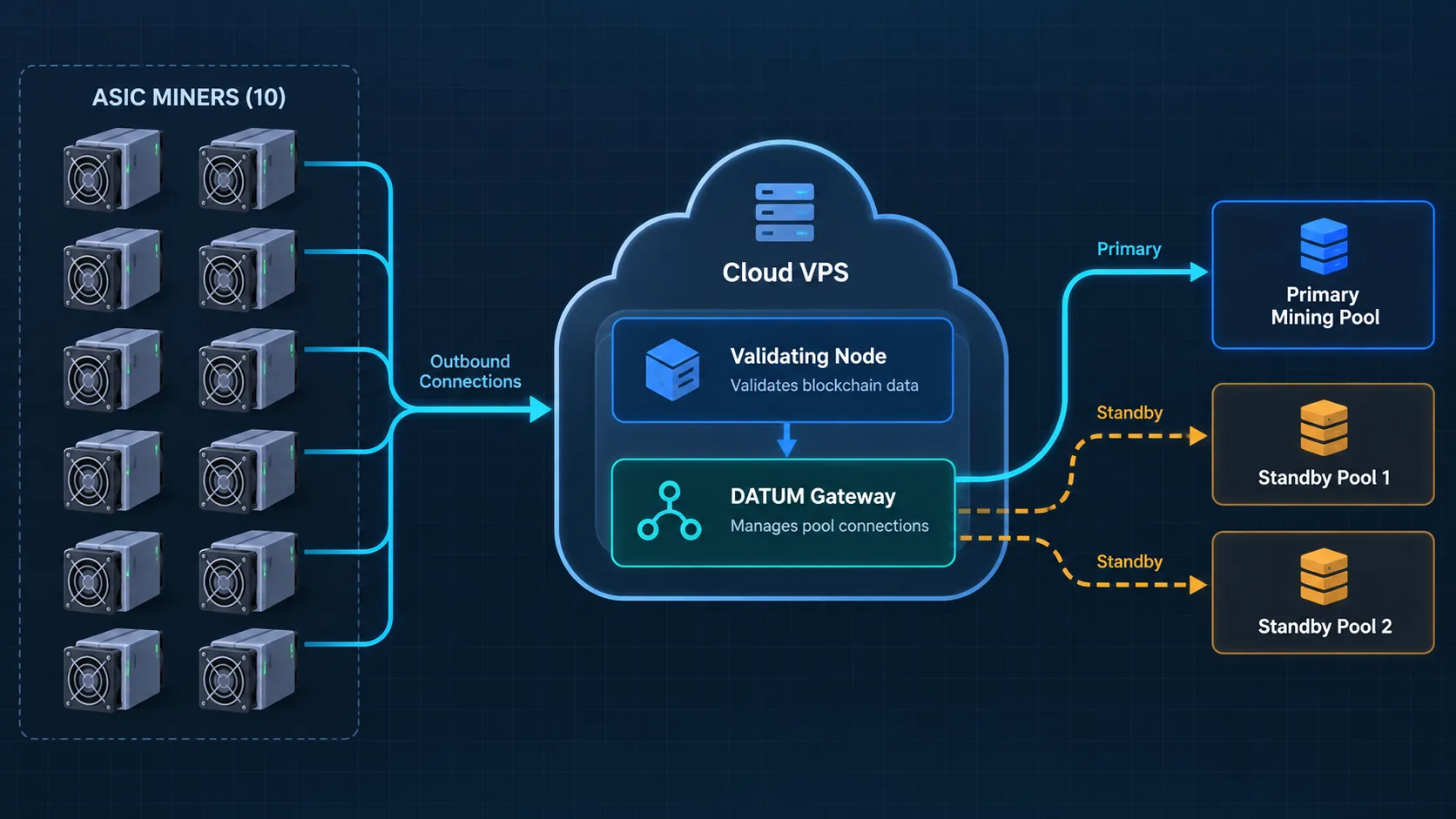
The practical path is: XBT node → DATUM Gateway → ASIC miners for mining work, while the gateway communicates with the DATUM pool for share validation and payouts. The Gateway’s own documentation describes these roles and notes that miner-side Stratum share counts can differ from final pool-side results.
What You Need Before You Start
- A US Contabo Cloud VPS 4 (4 vCPU, 8 GB RAM, 100 GB SSD) with a fixed public IPv4 address and SSH access. Our monthly cost is $8.20 USD; check the current checkout price for your configuration.
- An XBT-compatible Bitcoin Knots node build, the CONVOY DATUM Gateway, and a DATUM-capable XBT pool. This guide uses Lazarus as the primary pool; AlphaPool and XorPool are optional standby profiles.
- A public XBT/BTCB2 payout address and one candidate BLAKE2b ASIC for the first test. Never provide a seed phrase or private key.
- Codex or Claude Code with terminal access, plus time to let the node synchronize and observe one miner before migrating others.
A matching algorithm alone does not prove that a particular miner and firmware work on this chain and pool. Verify the exact model, firmware, connection protocol, and accepted shares. The BTCB2 miner collection is a starting point for hardware research, not a blanket compatibility guarantee.
Set Up Your XBT DATUM Node and Gateway
- Verify the software and pool details. Check the current authoritative XBT chain source, Bitcoin Knots build, CONVOY Gateway version or commit, Lazarus endpoint and key, and miner requirements. Record sources, checksums, and dates. Do not assume ordinary Bitcoin software or remembered settings will work unchanged on XBT.
- Prepare the VPS securely. Choose a current Ubuntu LTS release supported by your software. Set up an SSH key and a non-root administrator, prove that key login works, and only then disable password login. Allow the miner-facing Stratum port and SSH; keep node RPC and gateway management local to the server.
- Install and synchronize the XBT node. A pruned node can reduce disk use, but it still has to validate the chain. Before starting the Gateway, confirm synchronization is complete, compare height and block hash with an independent XBT explorer, and verify a BLAKE2b/header-v2
getblocktemplate. - Configure and start the Gateway. Connect it to the node’s loopback-only RPC, set the public payout address in the appropriate pool/gateway configuration, and configure Lazarus using its current DATUM instructions. Start the Gateway only after the node passes the previous check. Confirm the pool handshake, current template flow, service health, and the miner-facing listener.
- Keep a rollback path. Save a sanitized record of versions, test results, and working settings. Prepare standby pools separately; a successful handshake does not prove that live miner shares are accepted there. Leave the working Lazarus profile active unless you are deliberately testing a switch.
In our deployment, node RPC listens only on 127.0.0.1:8332, the Gateway API only on 127.0.0.1:7152, and miners connect to the VPS on TCP 42334. Those are our settings, not universal defaults. If the mining site’s public IP changes, the ASICs can still initiate outbound connections to the VPS’s stable IP or domain.
What We Verified on One XBT Miner
At 08:52 UTC on October 13, 2026, our first iBeLink BM-S3 had one established connection to the Gateway. Lazarus showed worker bm-s3-01 online on its DATUM path, with 78 session shares and zero rejected shares in that pool-side snapshot. The accepted-share count increased during our check. This confirms one miner connection and pool-side share attribution; it does not establish a sustained hashrate, a payout, or compatibility for every XBT/BLAKE2b miner. We had not independently recorded the ASIC dashboard, exact firmware, or a full one-hour stability test for this article.
For current setup details, consult the CONVOY Gateway, XBT node source, and Lazarus connection guide. Endpoints and software requirements can change. If you need help selecting candidate hardware, BT-Miners can help you compare options, but test the exact model before a full migration.
Connect Your First XBT Miner to the New Gateway
Keep the miner’s existing working pool entries as backups. In its private pool settings, use the Gateway’s reachable address—not the node RPC address. For our configuration, the fields are:
- Pool URL:
stratum+tcp://YOUR_VPS_IP_OR_DOMAIN:42334 - Worker: a unique label such as
miner-01; confirm the required format in your Gateway/pool profile - Password: the value required by the miner or profile;
xis commonly used when no actual pool password is required
For our setup, the public payout address is configured on the Gateway/pool side, so it is not pasted into the example worker field. Other profiles may use a different username format—verify before saving. Start with one miner, then check its live hashrate and accepted/rejected shares, Gateway connection and job delivery, and the pool’s worker and credited shares. Observe it long enough to catch intermittent failures before moving more machines. Do not mistake “connected” for “earning”: pool-side accepted work is the stronger check.
Copy This Prompt Into Codex or Claude Code
The prompt below asks the AI assistant to do the available technical work, show evidence at each checkpoint, and pause for actions only you should perform. Replace placeholders privately. It is not a substitute for reviewing commands, costs, and security settings.
Help me set up an XBT/BTCB2 DATUM mining gateway from zero, step by step. Assume I have no VPS, cloud account, SSH key, server configuration, or Linux experience. Start by helping me choose and purchase a suitable month-to-month VPS, then help me set it up. Do the safe technical work you can perform with my available browser and terminal access; explain each decision briefly, verify it, and keep a sanitized deployment log. Work with me one checkpoint at a time rather than giving me a long list of commands to execute alone.

My inputs:
- Network: the XBT/BTCB2 BLAKE2b Bitcoin fork, not ordinary Bitcoin. Verify chain identity and current requirements first.
- VPS preference: a low-cost US location, monthly billing, Ubuntu LTS, and an included stable public IPv4 address. I have not chosen or purchased a plan yet. Ask for my budget if needed.
- SSH access: help me create a local key and a non-root administrator after the VPS is ready. Never print, upload, or copy the private key.
- Primary pool: Lazarus DATUM. Treat AlphaPool and XorPool as optional standby profiles, not as proven live-share paths.
- First test miner: [EXACT BRAND, MODEL, FIRMWARE]. Do not assume all BLAKE2b miners are compatible.
- Public XBT payout address: [ENTER ONLY IN THE PRIVATE SERVER/POOL CONFIGURATION]. Never ask for my seed phrase or private key.
- Mining site: may have a changing public IP. Miners should make outbound connections to the VPS.

Work in this order:
1. Check current primary sources for the XBT chain, a chain-compatible Bitcoin Knots build, the CONVOY DATUM Gateway, Lazarus connection details, and VPS requirements. Record URLs, versions or commits, checksums, and check dates. Stop if chain identity or software authenticity is unclear.
2. Compare two or three currently available US VPS plans that meet the verified requirements. Check monthly billing, CPU architecture, RAM, SSD capacity for a pruned node, traffic limits, Ubuntu LTS support, and whether a stable public IPv4 address is included. Show the first-month total, any setup fee, and the recurring monthly total from current provider pages; explain trade-offs and recommend one. Do not assume an advertised price is the final checkout price or select an annual contract without my approval.
3. Guide me through account creation and checkout for the plan I choose. Help me check the region, image, billing term, IPv4 allocation, order summary, and cancellation terms before I confirm. I will personally enter payment details, complete CAPTCHA/2FA, and authorize the purchase. Do not place an order, accept terms, or submit payment for me. After provisioning, help me find the server's public IP and access method without posting credentials in chat.
4. Set up the VPS with me: create a local SSH key, establish and independently test key-based login with a non-root administrator, apply security updates, set a minimal firewall, and preserve a recovery path before disabling password or root login. Never expose passwords or tokens in chat, logs, or Git.
5. Install the verified XBT node and synchronize it natively. Pruning is acceptable if supported. Do not start the Gateway while initial block download is active. Compare current height and block hash with an independent explorer, confirm peers and pruning, and test BLAKE2b/header-v2 getblocktemplate.
6. Install a pinned, verified Gateway build. Configure node RPC and the management API on loopback only. Open only the necessary SSH and miner-facing Stratum ports. Configure my public payout address and current Lazarus DATUM endpoint/key in private files with restrictive permissions. Verify service health, pool handshake, template delivery, and listening addresses.
7. Prepare AlphaPool and XorPool as separate candidate profiles if their current official details can be verified. Test configuration and rollback without interrupting production miners. Return the active profile to Lazarus. Do not claim standby miner shares were tested unless they actually were.
8. Show me the exact fields for one miner: Gateway pool URL, worker name, and password format. Keep its known-good backup pools. Pause before I save the miner settings. After connection, collect miner-side, Gateway-side, and pool-side evidence for hashrate, accepted/rejected shares, and credited work for at least one hour. Do not migrate the rest until that test passes.
9. Give me a concise PASS/PARTIAL/UNVERIFIED checklist, a rollback plan, a weekly maintenance checklist, and a sanitized deployment record. Make no profitability or compatibility guarantees.

Human-only actions: I will authorize purchases, create the account with your guidance, enter payment and private credentials, complete CAPTCHA/2FA, and save miner settings. Pause at each of those checkpoints, then continue after I confirm completion. Ask for approval before a destructive change or a change that could interrupt mining. Never ask me to paste a wallet seed, private key, password, or SSH private key into chat.