使用 Codex 设置 XBT DATUM 矿池:所有 XBT 矿工指南

11 年 2026 月 XNUMX 日
BT 矿工
3查看
19分钟简报

使用 Codex 设置 XBT DATUM 矿池:所有 XBT 矿工指南

没有任何 Linux 经验的矿工能否搭建私有 DATUM 节点并连接 XBT 矿机?答案是肯定的。本指南涵盖了各种品牌的兼容 XBT/BLAKE2b ASIC 矿机,并提供可复制的 Codex 提示,以及我们 iBeLink BM-S3 的部署示例。

我们的部署方案使用低成本的美国VPS和精简后的Bitcoin Knots节点。计划的网关配置使用CONVOY,主XBT DATUM矿池为Lazarus,备用矿池为AlphaPool和XorPool。我们的测试集群包含约十台BM-S3矿机,部署在一个没有固定公网IP地址的站点;相同的网络布局也适用于其他兼容的XBT矿机。

部署状态,2026年10月12日: 该节点仍在验证 XBT 链。最近一次检查显示,它已验证了 976,785 个已知区块头中的第 883,719 个区块。 initialblockdownload: true 验证进度已完成约 78.5%。DATUM 网关已停止运行。矿池握手、故障转移和矿工份额结果尚未测试。以下步骤 9-14 为后续操作及其对应的 Codex 提示(可复制),并非表明这些测试已通过。验证完成后,我们将更新本文并提供实际结果。

这是一份操作指南,并非盈利承诺。终端、密钥、费用、软件和价格可能会发生变化,因此 Codex 必须核实官方来源。

命名说明: 这里,“XBT”指的是通常所说的BLAKE2b分支。 BTCB2;一些市场列表使用 BTC2B. 这些标签可能会与普通比特币的 XBT 代码混淆,因此在配置任何矿工之前,请验证链和 BLAKE2b 算法。

快速解答:新手可以搭建 XBT DATUM 节点吗?

是的,设有明确的检查点。

您负责身份验证、支付、验证码或双因素身份验证以及您的公开收款地址。Codex 负责研究、配置、安装、测试、故障排除和文档编写。

切勿将您的钱包助记词或私钥提供给 Codex 或任何矿池。挖矿仅需一个公开的支付地址。密码、一次性验证码和支付详情应直接输入到服务商的安全界面,切勿粘贴到聊天窗口中。

这是一个基于证据的步骤序列,而不是一个万能指令。在继续之前,请修复任何失败的检查。

什么是 XBT DATUM 矿池?DATUM 会改变什么?

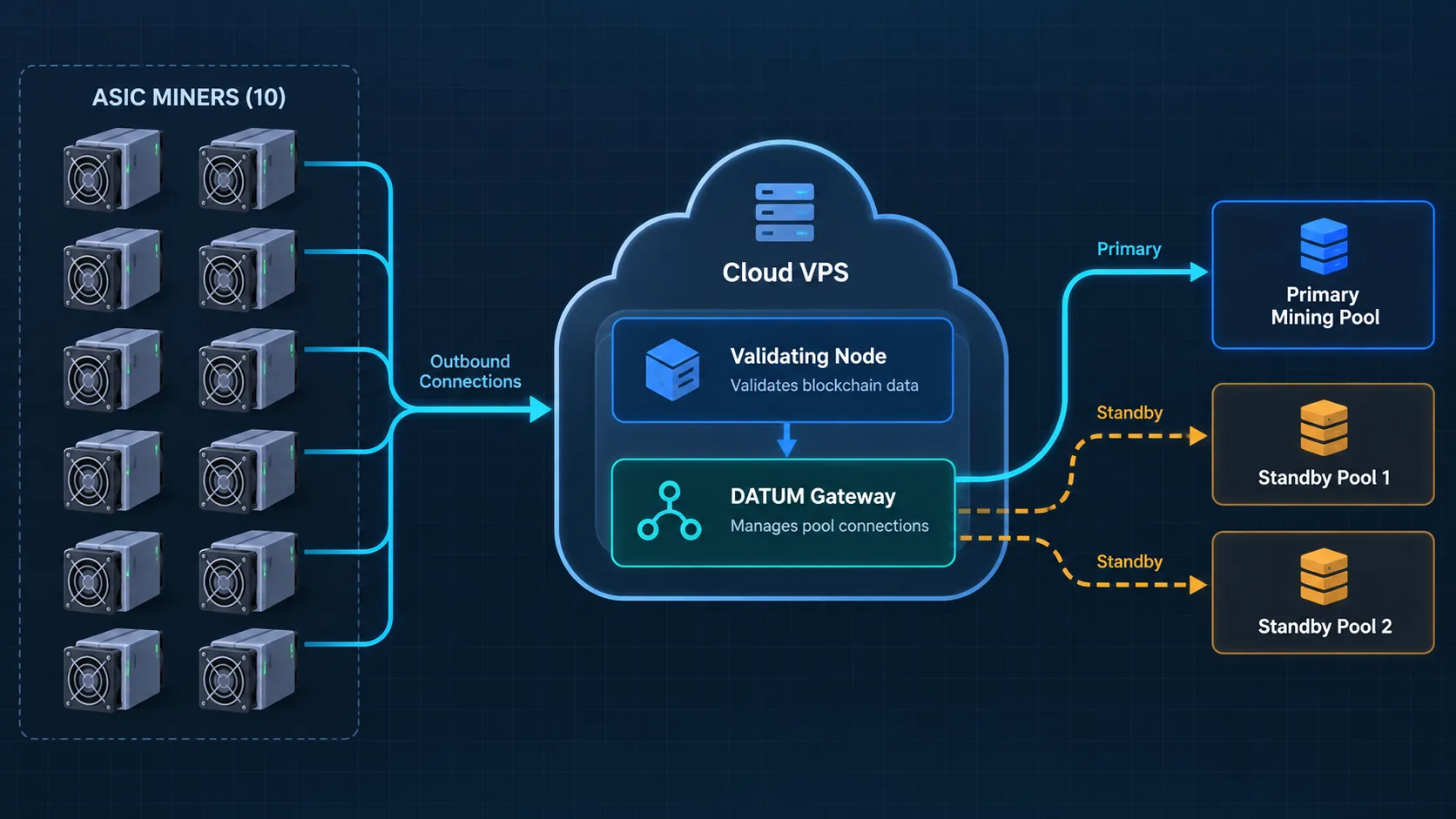
XBT DATUM概念架构,包含十台ASIC矿机、一个验证节点、一个网关以及主矿池和备用矿池。
概念架构:矿工通过出站连接连接到运行验证节点和 DATUM 网关的固定 IP VPS。

在传统的矿池连接中,ASIC矿机直接与Stratum服务器通信。矿池通常构建区块模板并决定哪些交易包含在区块中。矿工执行工作量证明,但区块构建的大部分决策仍然由上游服务器决定。

DATUM 通过三个层面改变了这种关系:

  1. 本地比特币兼容节点验证 XBT 链并构建区块模板。
  2. DATUM 网关将这些模板转换为现有 ASIC 矿机可以通过 Stratum 使用的作业。
  3. 具备 DATUM 功能的资金池可以协调份额和集中支付,而无需成为唯一的区块模板创建者。

Bitcoin Knots 提供验证服务,CONVOY 提供挖矿服务,Lazarus 是主要的 XBT DATUM 挖矿池。AlphaPool 和 XorPool 是备用选择;个人矿工无需创建完整节点。

每个兼容的 XBT 挖矿程序都会向 VPS 发起出站连接,因此挖矿站点的公网 IP 地址变化不会造成问题。域名是可选的。

如果您仍在比较生态系统,请阅读 BTCB2 矿池:如何实现算力去中心化 和更广泛 BIP-110 叉形采矿指南 隐形价值。

开始之前您需要什么

准备以下内容:

  • 首次测试需要一块兼容 XBT 的 BLAKE2b ASIC 芯片,品牌或型号不限。
  • 官方矿机固件以及对矿机网页界面的访问权限
  • 公开的 XBT/BTCB2 付款地址——绝非助记词或私钥
  • 一个云账户和每月大约 8-15 美元的 VPS 预算
  • 一台运行 Codex 的计算机,带有终端和文件访问权限
  • 是时候进行原生区块链同步并进入单矿工观察期了

我们的测试服务器是一台运行Ubuntu 24.04 LTS的美国Contabo Cloud VPS 4。购买时,每月费用约为8.20美元,包含足够精简节点使用的SSD容量、约8GB内存和2GB交换空间安全余量。付款前请务必确认当前条款。

您可以浏览兼容的型号。 BTCB2 矿机收藏。 该 iBeLink BM-S3 规格 描述我们的测试模型;其他品牌可能使用不同的网页界面标签和固件设置。

第一步:向 Codex 提供一份安全主简报

一家矿业运营商使用 Codex 来监控 XBT DATUM 服务器的部署。
Codex 可以指导研究、部署、验证和文档编制,同时运营商保留对机密和审批的控制权。

在指定的项目文件夹内新建一个 Codex 任务。第一个提示将确定任务结果、范围和审批规则。

复制此 Codex 提示

Help me deploy an XBT/BTCB2 DATUM node for my XBT-compatible BLAKE2b miners. My current fleet is approximately 10 iBeLink BM-S3 units, but the setup guide must work for other compatible brands and models too.

Requirements:
- Use a low-cost US VPS with a fixed public IPv4 address.
- Use Ubuntu LTS, a pruned Bitcoin Knots node, and the official CONVOY DATUM Gateway.
- Lazarus will be the primary pool. AlphaPool and XorPool should be manually selectable standby profiles.
- The mining location has no fixed public IP, so miners must make outbound connections to the VPS.
- Keep node RPC and the gateway management API on loopback only. Expose only SSH and the miner-facing Stratum port.
- Use official sources, verify checksums, pin software versions or commits, and keep a sanitized deployment record.
- Do not start the gateway until native initial block download is complete and getblocktemplate is verified.
- Test one miner before migrating the rest.

Safety rules:
- Never ask me for a wallet seed phrase, private key, payment card, password, or one-time code in chat.
- I will complete payment, CAPTCHA, 2FA, and sensitive form fields myself.
- Explain any irreversible or security-sensitive action before taking it.
- Never publish my VPS IP, payout address, usernames, credentials, or account identifiers.
- Do not publish the final blog article until I have reviewed and approved a preview.

First produce a staged implementation plan, a risk list, and a list of facts that must be verified from current official sources. Do not change any system yet.

Codex 应该返回分阶段的安装计划,而不是立即安装软件。如果它请求钱包密钥、暴露 RPC、跳过校验和验证,或者在测试任何矿机之前启动所有矿机,则应停止操作。

第二步:选择并购买VPS

请 Codex 对比当前的套餐方案。由于价格会随时间变化,因此应该使用当前供应商的页面信息,而不是内存数据。

复制此 Codex 提示

Compare currently available monthly US VPS plans for this deployment. I want month-to-month billing for the first test, a fixed public IPv4 address, Ubuntu 24.04 LTS or another supported Ubuntu LTS release, enough SSD storage for a pruned XBT node, and at least 4 GB RAM.

Show the real checkout price, renewal price, storage, bandwidth, region, IPv4 terms, and cancellation conditions. Recommend one plan, but stop before purchase. I will create the account, enter personal and payment information, complete CAPTCHA/2FA, and confirm the charge myself.

不仅要关注标价,还要核查存储空间、IPv4费用、安装费和合同期限。将规格和账单记录在案,只公布概括性信息。

步骤 3:在加固之前建立 SSH 访问

服务器提供商可能会先提供一个 root 密码。请勿将其粘贴到普通聊天消息中。更安全的做法是先安装一个 SSH 公钥,在第二个会话中验证密钥登录是否有效,创建一个非特权管理员账户,然后再禁用密码验证。

复制此 Codex 提示

Prepare secure SSH access to my new VPS.

Requirements:
- Generate a dedicated Ed25519 SSH key locally with a descriptive filename.
- Show me only the public-key fingerprint and where the private key is stored; never print the private key.
- If the provider requires an initial password, give me a secure local method to enter or store it temporarily without revealing it in chat or command history.
- Install the public key, create an unprivileged sudo administrator, and verify key login in a separate connection before changing SSH settings.
- Disable root login and password authentication only after the key test succeeds.
- Verify the effective configuration with sshd -T and perform a real negative password-login test.
- Keep one working session open until the second key-authenticated session succeeds.

Stop immediately if key login fails or if disabling passwords could lock me out.

为什么有效的测试至关重要

在我们的服务器上,早期的 cloud-init 文件覆盖了预期的 SSH 行为。Codex 检测到了这一点。 sshd -T添加了回归测试,修正了加载顺序,并证明仅密码登录失败而密钥登录有效。证据比命令成功退出更重要。

步骤 4:研究并固定当前的 XBT 软件

DATUM 的实现方式正在不断发展。在下载任何内容之前,请务必让 Codex 验证权威的存储库、版本、池端点、公钥以及链特定的要求。

复制此 Codex 提示

Research the current official software and connection data for this XBT/BTCB2 DATUM deployment.

Use primary sources only where possible. Verify:
- The current official Bitcoin Knots release suitable for the XBT chain and its published SHA256 checksums.
- The official AwokenLazarus XBT/Bitcoin repository and chain parameters.
- The official CONVOY DATUM Gateway repository and a specific commit to pin.
- Current Lazarus DATUM endpoint, port, public key, payout or username rules, and fee information.
- Current AlphaPool and XorPool DATUM endpoints and public keys for standby profiles.
- Whether any old direct-Stratum endpoint has been retired or replaced.

Create a source table with URL, value found, access date, and confidence. Flag disagreements instead of guessing. Do not install anything yet.

我们的构建固定了比特币结 29.4.2.knots20260508 以及特定的 CONVOY 提交。请验证较新的版本,而不是复制这些版本。AlphaPool 已弃用的 SV1 路由不应与其 DATUM 实现混淆。

步骤 5:构建经过测试的部署包

不要把线上服务器当作草稿本。请先让 Codex 在本地准备好配置模板、验证、测试和文档。

复制此 Codex 提示

Build a reusable local deployment package before changing the VPS.

It must include:
- A validated manifest for ports, pruning, memory, service users, and file paths.
- Separate Lazarus, AlphaPool, and XorPool profiles.
- Secure rendering of RPC credentials and my public payout address without committing live values to Git.
- systemd services for the node and gateway.
- A default-deny firewall policy.
- An atomic manual pool-switch command that validates the new profile and automatically rolls back if restart or health checks fail.
- A redaction tool that removes IPs, payout addresses, credentials, and account identifiers from evidence.
- Automated tests for configuration validation, secret handling, service files, firewall exposure, SSH hardening, switching, and rollback.

Use example values in tracked files. Put live configuration and secrets in ignored local files with restrictive permissions. Show the test results before touching the server.

源代码控制系统中仅保留示例。RPC 密码、实际支付地址、VPS 地址和提供商帐户信息绝不能进入 Git。

步骤 6:安装并验证 Bitcoin Knots 和 CONVOY

本地测试通过后,将已锁定的工件部署到 VPS。下载的二进制文件需要进行校验和验证;源代码构建需要记录提交信息和生成的二进制文件哈希值。

复制此 Codex 提示

Deploy the tested package to the VPS using the verified SSH key.

Installation requirements:
- Update Ubuntu packages and install only required build/runtime dependencies.
- Download Bitcoin Knots from the verified official source and compare the archive SHA256 with the published checksum before extracting it.
- Build the official CONVOY DATUM Gateway from the pinned commit.
- Record installed versions, source commit, archive hash, and final binary hashes in a sanitized deployment record.
- Run both services as a dedicated unprivileged user, not root.
- Configure approximately 4 GB pruning, a reasonable database cache for the VPS memory, and a small swap safety margin.
- Do not start the gateway yet.

After installation, show version output, ownership, permissions, systemd validation, and listening ports. Stop on any checksum mismatch, build warning that affects compatibility, or unexpected public listener.

我们的配置使用 4 GB 的修剪目标和 2 GB 的数据库缓存;请根据您的服务器调整并记录这些值。

步骤 7:配置私有 RPC、API 和防火墙规则

面向矿工的 Stratum 端口必须可访问,但管理服务不应公开。我们的设计允许 SSH 使用公共 TCP 端口 22,矿工可以使用 TCP 端口 42334。节点 RPC(端口 8332)和网关 API(端口 7152)仅绑定到该端口。 127.0.0.1.

复制此 Codex 提示

Apply and verify the network-security design.

Requirements:
- Default-deny unsolicited inbound traffic.
- Allow SSH TCP 22 with sensible rate limiting.
- Allow the miner-facing DATUM/Stratum TCP port 42334.
- Bind Bitcoin RPC 8332 and the gateway management API 7152 to 127.0.0.1 only.
- Do not publicly expose RPC, the gateway API, database ports, or unnecessary Bitcoin peer ports.
- Keep outbound traffic available for node peers, software updates, DNS, and DATUM pool connections.
- Enable automatic security updates and log rotation.

Verify with local socket inspection and an external reachability test. Show a concise table of intended versus actual listeners. Do not reveal credentials in logs or the report.

公共端口 42334 允许动态连接的矿工访问 VPS。此外,如果矿场配备了始终在线的路由器或网关,WireGuard 可以降低风险暴露。

步骤 8:让节点完成本地同步

仅启动节点。原生初始区块下载会从创世区块开始验证链,避免依赖第三方快照。区块修剪会限制保留的区块数据,但并不能消除验证时间。

复制此 Codex 提示

Start the XBT Bitcoin Knots service and monitor initial block download safely.

Do not start or restart the DATUM Gateway while initialblockdownload is true. At reasonable intervals, record only:
- local block height and header height
- verification progress
- initialblockdownload status
- peer count
- pruning status and prune height
- service health and disk usage

Compare the local header or block tip with an independent current Lazarus XBT explorer. If synchronization is progressing normally, remain quiet. Notify me only for completion, a stalled or failing service, abnormal disk pressure, or required user action. Never use an unverified blockchain snapshot.

同步可能需要数小时或更长时间。开放的矿机端口并不代表节点可以创建有效的当前工作;请保持网关关闭。

步骤 9:验证链身份和 getblocktemplate

这是关键的链特定检查点。一个运行无误的通用比特币节点可能仍然不适用于 BLAKE2b/header-v2 XBT 网络。

复制此 Codex 提示

Now that initialblockdownload is false, perform the pre-gateway verification.

Verify:
- local height agrees with the current independent Lazarus explorer
- the node has multiple healthy peers
- pruning is active and consistent with the configured target
- chain identity and network parameters match XBT/BTCB2
- getblocktemplate succeeds with the required BLAKE2b/header-v2 rules
- node RPC remains loopback-only
- the node service is stable after a clean restart

Save sanitized evidence with timestamps. If any check fails, keep the gateway stopped and diagnose the cause. Do not weaken validation to make the test pass.

当前结果: 初始区块下载仍在进行中。最终高度比较、节点数量、链标识和 BLAKE2b/header-v2 getblocktemplate 同步后将添加结果。

步骤 10:将 Lazarus 设置为主要池

只有当节点通过上一个检查点后,Codex 才应该激活 Lazarus 配置文件并启动 CONVOY。

复制此 Codex 提示

Activate the verified Lazarus DATUM profile and start the gateway.

Before starting, re-check the current official Lazarus endpoint and pinned public key. Then verify:
- the systemd service starts under the unprivileged service account
- the gateway authenticates or handshakes with Lazarus as expected
- it can obtain a current template from the local node
- the miner-facing port 42334 listens publicly
- RPC 8332 and API 7152 remain loopback-only
- logs contain no RPC password, payout address, private key material, or other secrets

If the handshake fails, stop the service and diagnose the endpoint, public key, DNS, clock, and configuration. Do not disable identity checks merely to connect.

挖矿程序的 URL 通常如下所示:

stratum+tcp://YOUR_VPS_IP:42334

仅在矿工的私有界面中替换占位符。从屏幕截图中删除该占位符。

步骤 11:首先连接一台 XBT 矿机

先测试一个 ASIC,并保留其已知良好的备份池条目。

复制此 Codex 提示

Guide me through connecting one XBT-compatible BLAKE2b miner to the new gateway. Ask me for its brand, model, and firmware version; do not assume every miner uses the same settings menu.

First verify the pool URL and worker-name format against this miner's documentation, the gateway, and Lazarus requirements. Give me the exact fields to enter, using placeholders for my private VPS address and worker name. I will log in to the miner and save the settings myself.

After connection, help me compare:
1. miner status: connected, hashrate, accepted shares, rejected shares
2. local gateway logs or statistics: worker connection and accepted shares
3. Lazarus pool dashboard or payout-address view: credited work

Observe one miner for at least one hour before recommending batch migration. Never request the miner admin password in chat, and tell me how to redact screenshots.

仅凭绿色指示灯是不够的。需在 ASIC、网关和矿池中确认已接受的份额。调查拒绝原因,例如延迟、过期工作、工作节点格式、固件或链不匹配。

当前结果:尚未有矿机迁移到此网关。请在更换矿机前,确认 URL 和矿工格式与当前网关、所选 XBT DATUM 矿池以及设备固件是否一致。首次测试后,我们将添加一小时份额和矿池积分的观测数据。

有关更全面的硬件验证流程,请参阅Bitcoin BLAKE2b Fork SC 矿机测试指南。

步骤 12:分批迁移剩余矿机

第一个矿工稳定运行后,将其他矿工分小组移动,以免一个问题导致整个矿场离线。

复制此 Codex 提示

Create a controlled migration checklist for the remaining XBT-compatible miners. Record each device's brand, model, and firmware so model-specific differences are visible.

Use small batches. For each miner, record a non-sensitive device label, firmware version, start time, connection state, observed hashrate, accepted shares, rejected shares, and backup-pool status. Do not record admin passwords.

After every batch, compare total gateway hashrate and worker count with the sum expected from the miners. Pause the migration if rejection rate rises, workers flap, the gateway becomes resource constrained, or pool-side accounting does not match. Keep a rollback path to the previous known-good miner pool settings.

十个矿工并不需要十个节点。虚拟专用服务器 (VPS) 负责验证、构建模板和分配工作负载;随着单元的增加,请监控其资源和延迟。

步骤 13:测试 AlphaPool 和 XorPool 的自动回滚功能

待机设置只有在经过实际切换和回滚测试后才有用。

复制此 Codex 提示

Test the AlphaPool and XorPool DATUM standby profiles one at a time using the atomic switch tool.

For each profile:
- re-verify the current official endpoint, public key, and pool requirements
- validate the local profile before activation
- record the current known-good profile
- atomically switch, restart the gateway, and check service health, DATUM handshake, template flow, and miner-facing port
- if any check fails, automatically restore and restart the previous profile
- save sanitized evidence of the result

Also run a deliberate rollback test with a harmless invalid test profile. When all testing is complete, return the active profile to Lazarus and verify it again. Do not move production miners during a failed or ambiguous test.

手动切换是有意为之:费用、延迟、支付规则和可靠性都至关重要。

当前结果:这些实时池握手和回滚测试正在进行中。备用配置文件已准备就绪,但准备好的配置文件并不能证明连接性。

步骤 14:运行最终安全性和回归测试

最后一步实现了可维护的交接。

复制此 Codex 提示

Perform the final deployment review and produce a sanitized handoff.

Verify again:
- SSH key login works; root login and password authentication are effectively disabled
- the firewall is default-deny and exposes only intended ports
- RPC and management API are loopback-only
- services run unprivileged and restart correctly after reboot
- secrets and live configuration have restrictive permissions and are ignored by Git
- package updates, log rotation, disk usage, pruning, swap, time sync, and backups are healthy
- Lazarus is the active profile after standby testing
- the full automated regression suite passes
- the deployment record contains versions, hashes, dates, decisions, test evidence, and rollback instructions but no secrets

Then give me a concise weekly/monthly maintenance checklist. Show me the final blog preview, but do not publish it until I explicitly approve publication.

XBT DATUM 安全检查清单

在宣布部署完成之前,请确认以下每一项:

  • 钱包助记词和私钥从未被共享。
  • 仅使用了公开的付款地址。
  • VPS支付、密码、验证码和双因素身份验证均由人工控制。
  • 专用 SSH 密钥有效,其私钥部分保留在本地。
  • 已验证有效的 SSH 设置,而非想当然地认为所有设置都有效。
  • RPC 和管理 API 绑定到 127.0.0.1
  • 防火墙仅开放必要的挖矿和管理端口。
  • 下载校验和及源代码提交记录会被记录。
  • 节点和网关以非特权用户身份运行
  • 本地同步在网关启动前完成
  • 当地高度与独立探险家相符
  • BLAKE2b/header-v2 getblocktemplate 成功
  • 一台矿机在批量迁移前通过了监控测试
  • 对每个备用方案和回滚路径都进行了测试。
  • 公开文档中已清除IP地址、地址、凭证和帐户ID。

常見問題解答

我需要在挖矿现场设置固定公网IP地址吗?

不。XBT 矿机主动发起与 VPS 的出站连接。VPS 需要稳定可访问的地址;矿场的公网 IP 地址可能会改变。

DATUM 是否增加了验证节点的数量?

它可以鼓励更多矿工运行自己的验证和模板构建基础设施,但这并非其唯一目的。关键的改变在于,在保留共享份额核算机制的同时,将区块模板构建和交易选择流程更靠近矿工。

总结

个人 DATUM 节点允许矿工从已验证的链上构建算力,同时保留池化奖励。固定 IP VPS 也为没有静态地址的矿工提供服务。

没有 Linux 背景并不意味着盲目信任。Codex 将 XBT DATUM 矿池部署分解为可审查的阶段、证据、测试和文档。

先从一台矿工开始。不要在聊天记录和 Git 中泄露机密信息。在每个安全边界都要求验证。在需要之前先测试回滚功能。只有测试通过后,才能迁移剩余的矿场资源。

如果您计划部署 XBT 挖矿或需要帮助选择兼容的 BLAKE2b 硬件,请联系BT-Miners以获取当前硬件可用性和部署指导。

资料来源和进一步阅读

上一篇
这是最新文章!
下一篇
这是最后一篇文章!