Codex를 이용한 XBT DATUM 마이닝 풀 설정: 모든 XBT 마이너를 위한 가이드

10월 11 2026
BT-마이너
3보기
19 분 읽음

Codex를 이용한 XBT DATUM 마이닝 풀 설정: 모든 XBT 마이너를 위한 가이드

리눅스 경험이 전혀 없는 마이너도 개인 DATUM 노드를 구축하고 XBT 마이너를 연결할 수 있을까요? 네, 가능합니다. 이 가이드에서는 다양한 브랜드의 호환 가능한 XBT/BLAKE2b ASIC에 대한 정보를 제공하며, 복사해서 사용할 수 있는 Codex 안내문과 iBeLink BM-S3 구축 사례를 예시로 제시합니다.

저희 배포 환경은 저렴한 미국 VPS와 정리된 Bitcoin Knots 노드를 사용합니다. 계획된 게이트웨이 구성은 CONVOY를 사용하고, 기본 XBT DATUM 마이닝 풀로는 Lazarus를, 대기 프로필로는 AlphaPool과 XorPool을 사용합니다. 테스트 환경은 고정 공용 IP가 없는 사이트에 약 10대의 BM-S3 장치로 구성되어 있으며, 다른 호환 가능한 XBT 마이너에도 동일한 네트워크 구성이 적용됩니다.

배포 현황, 2026년 10월 12일: 해당 노드는 여전히 XBT 체인을 검증하고 있습니다. 최근 확인 결과, 알려진 헤더 976,785개 중 883,719번째 블록의 유효성을 검증했습니다. initialblockdownload: true 현재 검증 진행률은 약 78.5%입니다. DATUM 게이트웨이는 의도적으로 중지된 상태입니다. 풀 핸드셰이크, 페일오버 및 마이너 공유 결과는 아직 테스트되지 않았습니다. 아래 9~14단계는 다음 작업 및 복사 가능한 Codex 프롬프트이며, 해당 테스트가 통과되었다는 것을 보장하는 것은 아닙니다. 검증 후 측정 결과를 이 문서에 업데이트하겠습니다.

이는 운영 지침일 뿐 수익성을 보장하는 것은 아닙니다. 엔드포인트, 키, 수수료, 소프트웨어 및 가격은 변경될 수 있으므로 Codex는 공식 출처를 확인해야 합니다.

명명 관련 참고 사항: 여기서 "XBT"는 일반적으로 BLAKE2b 포크라고 불리는 버전을 의미합니다. BTCB2; 일부 시장 목록에서 사용 BTC2B. 이러한 레이블은 일반 비트코인의 XBT 티커와 혼동될 수 있으므로, 마이너를 설정하기 전에 체인과 BLAKE2b 알고리즘을 확인하십시오.

빠른 답변: 초보자도 XBT DATUM 노드를 구축할 수 있나요?

네, 명확한 검문소가 있습니다.

본인 확인, 결제, CAPTCHA 또는 2단계 인증, 그리고 공개 지급 주소는 사용자가 직접 관리합니다. Codex는 조사, 구성, 설치, 테스트, 문제 해결 및 문서화를 담당합니다.

Codex를 비롯한 어떤 채굴 풀에도 지갑 시드 구문이나 개인 키를 절대 제공하지 마세요. 채굴에는 공개된 지급 주소만 있으면 됩니다. 비밀번호, 일회용 코드, 결제 정보는 채팅창에 붙여넣지 말고 제공업체의 보안 인터페이스에 직접 입력해야 합니다.

이는 마법 같은 명령 하나가 아니라 증거에 기반한 일련의 단계입니다. 진행하기 전에 실패한 검사를 모두 수정하십시오.

XBT DATUM 마이닝 풀이란 무엇이며, DATUM은 무엇을 변경합니까?

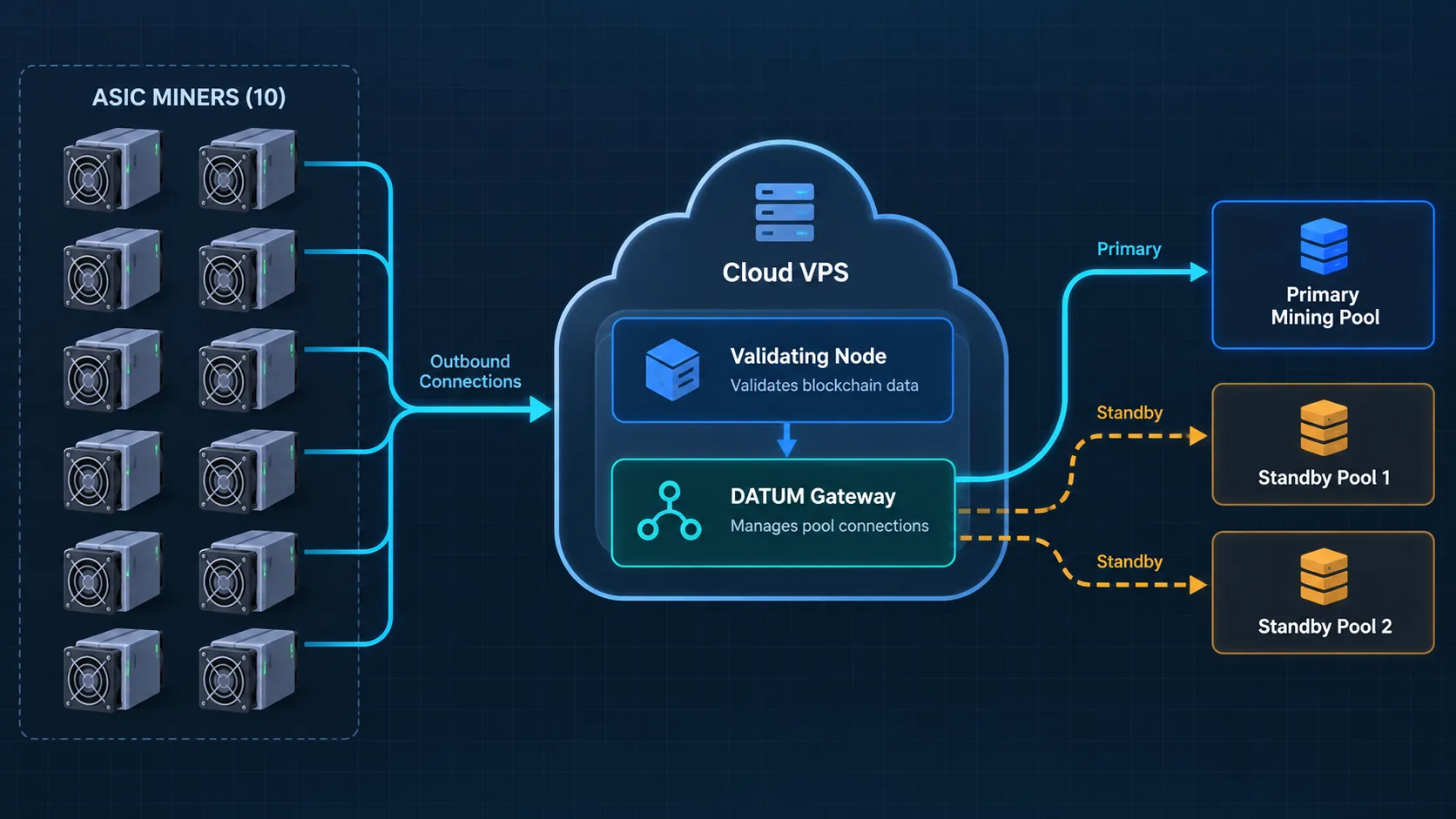
XBT DATUM의 개념적 아키텍처는 10개의 ASIC 마이너, 검증 노드, 게이트웨이, 기본 및 대기 풀로 구성됩니다.
개념적 아키텍처: 마이너는 검증 노드와 DATUM 게이트웨이가 실행되는 고정 IP VPS에 외부로 연결됩니다.

일반적인 풀 연결 방식에서 ASIC는 Stratum 서버와 직접 통신합니다. 풀은 일반적으로 블록 템플릿을 구성하고 어떤 트랜잭션이 포함될지 결정합니다. 마이너는 작업 증명을 수행하지만, 블록 구성에 대한 대부분의 결정은 상위 풀에서 이루어집니다.

DATUM은 세 가지 계층을 통해 이러한 관계를 변화시킵니다.

  1. 로컬 비트코인 ​​호환 노드가 XBT 체인을 검증하고 블록 템플릿을 생성합니다.
  2. DATUM 게이트웨이는 이러한 템플릿을 기존 ASIC 채굴기가 Stratum을 통해 사용할 수 있는 작업으로 변환합니다.
  3. DATUM 기능을 갖춘 풀은 블록 템플릿을 단독으로 생성하지 않고도 지분과 공동 지급금을 조정합니다.

Bitcoin Knots는 검증을 담당하고, CONVOY는 작업을 처리하며, Lazarus는 주요 XBT DATUM 채굴 풀입니다. AlphaPool과 XorPool은 예비 풀이며, 개인 채굴자는 전체 노드를 구성할 필요가 없습니다.

XBT와 호환되는 각 마이너는 VPS로 외부 연결을 시작하므로 마이닝 사이트의 공용 IP 주소 변경은 문제가 되지 않습니다. 도메인은 선택 사항입니다.

생태계를 계속 비교하고 있다면, 읽어보세요. BTCB2 마이닝 풀: 해시레이트를 분산화하는 방법 그리고 더 넓은 BIP-110 포크 마이닝 가이드 먼저.

시작하기 전에 필요한 것

다음을 준비하십시오.

  • 첫 번째 테스트에는 브랜드나 모델에 관계없이 XBT와 호환되는 BLAKE2b ASIC 하나를 사용합니다.
  • 공식 채굴기 펌웨어 및 채굴기 웹 인터페이스 접속 권한
  • 공개 XBT/BTCB2 지급 주소 - 시드 구문이나 개인 키는 절대 사용하지 마세요.
  • 클라우드 계정과 월 8~15달러 정도의 VPS 예산이 필요합니다.
  • 터미널 및 파일 접근이 가능한 Codex 실행 컴퓨터
  • 네이티브 블록체인 동기화 및 단일 채굴자 관찰 기간을 위한 시간

저희 테스트 서버는 미국 Contabo Cloud VPS 4이며 Ubuntu 24.04 LTS를 실행하고 있습니다. 구매 당시 월 약 8.20달러였으며, 정리된 노드를 구성하기에 충분한 SSD 용량, 약 8GB RAM, 그리고 2GB의 스왑 공간이 포함되어 있었습니다. 결제 전에 현재 약관을 확인하십시오.

호환되는 모델은 다음에서 찾아보실 수 있습니다. BTCB2 마이너 컬렉션. 그만큼 iBeLink BM-S3 사양 본 테스트 모델에 대한 설명입니다. 다른 브랜드는 웹 인터페이스 명칭 및 펌웨어 설정이 다를 수 있습니다.

1단계: Codex에 안전 마스터 브리핑 자료를 제공하십시오.

Codex를 사용하여 XBT DATUM 서버 배포를 관리하는 채굴 운영자
Codex는 연구, 배포, 검증 및 문서화에 대한 지침을 제공하는 동시에 운영자는 기밀 및 승인에 대한 통제권을 유지합니다.

전용 프로젝트 폴더 내에서 새 Codex 작업을 시작하세요. 첫 번째 프롬프트에서 결과, 범위 및 승인 규칙을 설정합니다.

이 코덱스 프롬프트를 복사하세요

Help me deploy an XBT/BTCB2 DATUM node for my XBT-compatible BLAKE2b miners. My current fleet is approximately 10 iBeLink BM-S3 units, but the setup guide must work for other compatible brands and models too.

Requirements:
- Use a low-cost US VPS with a fixed public IPv4 address.
- Use Ubuntu LTS, a pruned Bitcoin Knots node, and the official CONVOY DATUM Gateway.
- Lazarus will be the primary pool. AlphaPool and XorPool should be manually selectable standby profiles.
- The mining location has no fixed public IP, so miners must make outbound connections to the VPS.
- Keep node RPC and the gateway management API on loopback only. Expose only SSH and the miner-facing Stratum port.
- Use official sources, verify checksums, pin software versions or commits, and keep a sanitized deployment record.
- Do not start the gateway until native initial block download is complete and getblocktemplate is verified.
- Test one miner before migrating the rest.

Safety rules:
- Never ask me for a wallet seed phrase, private key, payment card, password, or one-time code in chat.
- I will complete payment, CAPTCHA, 2FA, and sensitive form fields myself.
- Explain any irreversible or security-sensitive action before taking it.
- Never publish my VPS IP, payout address, usernames, credentials, or account identifiers.
- Do not publish the final blog article until I have reviewed and approved a preview.

First produce a staged implementation plan, a risk list, and a list of facts that must be verified from current official sources. Do not change any system yet.

Codex는 소프트웨어를 즉시 설치하는 대신 단계별 계획을 반환해야 합니다. 지갑 비밀 키를 요청하거나, RPC를 노출하거나, 체크섬 검증을 건너뛰거나, 하나의 마이너를 테스트하기 전에 모든 마이너를 시작하는 경우 중지해야 합니다.

2단계: VPS 선택 및 구매

Codex에 현재 요금제를 비교해 달라고 요청하세요. 가격은 시간에 따라 변동될 수 있으므로, 기억에 의존하기보다는 최신 제공업체 페이지를 활용해야 합니다.

이 코덱스 프롬프트를 복사하세요

Compare currently available monthly US VPS plans for this deployment. I want month-to-month billing for the first test, a fixed public IPv4 address, Ubuntu 24.04 LTS or another supported Ubuntu LTS release, enough SSD storage for a pruned XBT node, and at least 4 GB RAM.

Show the real checkout price, renewal price, storage, bandwidth, region, IPv4 terms, and cancellation conditions. Recommend one plan, but stop before purchase. I will create the account, enter personal and payment information, complete CAPTCHA/2FA, and confirm the charge myself.

저장 용량, IPv4 요금, 설치비, 계약 기간 등도 확인하세요. 단순히 가격만 따지지 마십시오. 사양 및 청구 내역은 비공개로 유지하고, 일반적인 정보만 공개하세요.

3단계: 보안 강화 전에 SSH 접속 권한을 확보하십시오.

서버 제공업체에서 처음에 루트 암호를 제공할 수 있습니다. 이 암호를 일반 채팅 메시지에 붙여넣지 마십시오. 더 안전한 방법은 SSH 공개 키를 설치하고, 두 번째 세션에서 키 로그인이 작동하는지 확인한 후, 권한이 없는 관리자 계정을 생성하고 나서야 암호 인증을 비활성화하는 것입니다.

이 코덱스 프롬프트를 복사하세요

Prepare secure SSH access to my new VPS.

Requirements:
- Generate a dedicated Ed25519 SSH key locally with a descriptive filename.
- Show me only the public-key fingerprint and where the private key is stored; never print the private key.
- If the provider requires an initial password, give me a secure local method to enter or store it temporarily without revealing it in chat or command history.
- Install the public key, create an unprivileged sudo administrator, and verify key login in a separate connection before changing SSH settings.
- Disable root login and password authentication only after the key test succeeds.
- Verify the effective configuration with sshd -T and perform a real negative password-login test.
- Keep one working session open until the second key-authenticated session succeeds.

Stop immediately if key login fails or if disabling passwords could lock me out.

효과적인 테스트가 중요한 이유

저희 서버에서는 이전 클라우드 초기화 파일이 의도된 SSH 동작을 덮어썼습니다. Codex는 이를 감지했습니다. sshd -T회귀 테스트를 추가하고, 로드 순서를 수정했으며, 비밀번호만으로는 로그인이 실패하고 키로는 로그인이 성공한다는 것을 입증했습니다. 명령 실행이 성공적으로 종료되는 것보다 증거가 더 중요합니다.

4단계: 현재 사용 중인 XBT 소프트웨어를 조사하고 고정합니다.

DATUM 구현은 계속 발전하고 있습니다. 다운로드하기 전에 Codex에서 권위 있는 저장소, 릴리스, 풀 엔드포인트, 공개 키 및 체인별 요구 사항을 검증하십시오.

이 코덱스 프롬프트를 복사하세요

Research the current official software and connection data for this XBT/BTCB2 DATUM deployment.

Use primary sources only where possible. Verify:
- The current official Bitcoin Knots release suitable for the XBT chain and its published SHA256 checksums.
- The official AwokenLazarus XBT/Bitcoin repository and chain parameters.
- The official CONVOY DATUM Gateway repository and a specific commit to pin.
- Current Lazarus DATUM endpoint, port, public key, payout or username rules, and fee information.
- Current AlphaPool and XorPool DATUM endpoints and public keys for standby profiles.
- Whether any old direct-Stratum endpoint has been retired or replaced.

Create a source table with URL, value found, access date, and confidence. Flag disagreements instead of guessing. Do not install anything yet.

저희 빌드는 비트코인 ​​매듭을 고정했습니다. 29.4.2.knots20260508 그리고 특정 CONVOY 커밋을 참조하십시오. 이러한 버전을 복사하는 대신 최신 릴리스를 확인하십시오. AlphaPool의 더 이상 사용되지 않는 SV1 경로는 DATUM 구현과 혼동해서는 안 됩니다.

5단계: 테스트를 거친 배포 패키지 빌드

실제 운영 서버를 임시 작업 공간으로 사용하지 마십시오. Codex에 요청하여 구성 템플릿, 유효성 검사, 테스트 및 문서를 먼저 로컬 환경에서 준비하십시오.

이 코덱스 프롬프트를 복사하세요

Build a reusable local deployment package before changing the VPS.

It must include:
- A validated manifest for ports, pruning, memory, service users, and file paths.
- Separate Lazarus, AlphaPool, and XorPool profiles.
- Secure rendering of RPC credentials and my public payout address without committing live values to Git.
- systemd services for the node and gateway.
- A default-deny firewall policy.
- An atomic manual pool-switch command that validates the new profile and automatically rolls back if restart or health checks fail.
- A redaction tool that removes IPs, payout addresses, credentials, and account identifiers from evidence.
- Automated tests for configuration validation, secret handling, service files, firewall exposure, SSH hardening, switching, and rollback.

Use example values in tracked files. Put live configuration and secrets in ignored local files with restrictive permissions. Show the test results before touching the server.

소스 코드 관리 시스템에는 예제 코드만 보관하십시오. RPC 비밀번호, 실제 지급 주소, VPS 주소 및 공급자 계정 정보는 Git에 입력해서는 안 됩니다.

6단계: Bitcoin Knots 및 CONVOY를 설치하고 인증합니다.

로컬 테스트가 통과되면 고정된 아티팩트를 VPS에 배포합니다. 다운로드한 바이너리는 체크섬 검증이 필요하며, 소스 빌드는 커밋 기록과 결과 바이너리 해시가 필요합니다.

이 코덱스 프롬프트를 복사하세요

Deploy the tested package to the VPS using the verified SSH key.

Installation requirements:
- Update Ubuntu packages and install only required build/runtime dependencies.
- Download Bitcoin Knots from the verified official source and compare the archive SHA256 with the published checksum before extracting it.
- Build the official CONVOY DATUM Gateway from the pinned commit.
- Record installed versions, source commit, archive hash, and final binary hashes in a sanitized deployment record.
- Run both services as a dedicated unprivileged user, not root.
- Configure approximately 4 GB pruning, a reasonable database cache for the VPS memory, and a small swap safety margin.
- Do not start the gateway yet.

After installation, show version output, ownership, permissions, systemd validation, and listening ports. Stop on any checksum mismatch, build warning that affects compatibility, or unexpected public listener.

저희 구성에서는 4GB의 정리 대상과 2GB의 데이터베이스 캐시를 사용합니다. 서버에 맞게 이러한 값을 조정하고 기록해 두십시오.

7단계: 비공개 RPC, API 및 방화벽 규칙 구성

마이너용 Stratum 포트는 접근 가능해야 하지만, 관리 서비스는 공개되어서는 안 됩니다. 저희 설계에서는 SSH용으로 TCP 22번 포트를, 마이너용으로 TCP 42334번 포트를 공개 포트로 허용합니다. 노드 RPC는 8332번 포트에서, 게이트웨이 API는 7152번 포트에서 특정 포트에만 바인딩됩니다. 127.0.0.1.

이 코덱스 프롬프트를 복사하세요

Apply and verify the network-security design.

Requirements:
- Default-deny unsolicited inbound traffic.
- Allow SSH TCP 22 with sensible rate limiting.
- Allow the miner-facing DATUM/Stratum TCP port 42334.
- Bind Bitcoin RPC 8332 and the gateway management API 7152 to 127.0.0.1 only.
- Do not publicly expose RPC, the gateway API, database ports, or unnecessary Bitcoin peer ports.
- Keep outbound traffic available for node peers, software updates, DNS, and DATUM pool connections.
- Enable automatic security updates and log rotation.

Verify with local socket inspection and an external reachability test. Show a concise table of intended versus actual listeners. Do not reveal credentials in logs or the report.

공용 포트 42334를 통해 동적 연결을 사용하는 채굴자는 VPS에 접근할 수 있습니다. 채굴 환경에 상시 가동되는 라우터나 게이트웨이가 있는 경우, WireGuard를 통해 노출 위험을 줄일 수 있습니다.

8단계: 노드가 네이티브 동기화를 완료하도록 합니다.

노드만 시작하세요. 네이티브 초기 블록 다운로드를 통해 제네시스부터 체인의 유효성을 검증하고 제3자 스냅샷에 의존하지 않아도 됩니다. 블록 가지치기는 유지되는 블록 데이터의 양을 제한하지만, 유효성 검증 시간을 완전히 없애지는 않습니다.

이 코덱스 프롬프트를 복사하세요

Start the XBT Bitcoin Knots service and monitor initial block download safely.

Do not start or restart the DATUM Gateway while initialblockdownload is true. At reasonable intervals, record only:
- local block height and header height
- verification progress
- initialblockdownload status
- peer count
- pruning status and prune height
- service health and disk usage

Compare the local header or block tip with an independent current Lazarus XBT explorer. If synchronization is progressing normally, remain quiet. Notify me only for completion, a stalled or failing service, abnormal disk pressure, or required user action. Never use an unverified blockchain snapshot.

동기화에는 몇 시간 이상 소요될 수 있습니다. 마이너 포트가 열려 있다고 해서 노드가 유효한 현재 작업을 생성할 수 있다는 것을 보장하는 것은 아닙니다. 게이트웨이를 중지 상태로 유지하십시오.

9단계: 체인 신원 확인 및 getblocktemplate

이는 체인별 핵심 검사 지점입니다. 오류 없이 실행되는 일반 비트코인 ​​노드라도 BLAKE2b/header-v2 XBT 네트워크에서는 제대로 작동하지 않을 수 있습니다.

이 코덱스 프롬프트를 복사하세요

Now that initialblockdownload is false, perform the pre-gateway verification.

Verify:
- local height agrees with the current independent Lazarus explorer
- the node has multiple healthy peers
- pruning is active and consistent with the configured target
- chain identity and network parameters match XBT/BTCB2
- getblocktemplate succeeds with the required BLAKE2b/header-v2 rules
- node RPC remains loopback-only
- the node service is stable after a clean restart

Save sanitized evidence with timestamps. If any check fails, keep the gateway stopped and diagnose the cause. Do not weaken validation to make the test pass.

현재 결과: 초기 블록 다운로드가 아직 진행 중입니다. 최종 높이 비교, 피어 수, 체인 식별 정보 및 BLAKE2b/헤더-v2 정보는 추후 공개될 예정입니다. getblocktemplate 동기화 후 결과가 추가됩니다.

10단계: 라자루스를 기본 풀로 시작합니다.

노드가 이전 체크포인트를 통과한 후에만 Codex는 Lazarus 프로필을 활성화하고 CONVOY를 시작해야 합니다.

이 코덱스 프롬프트를 복사하세요

Activate the verified Lazarus DATUM profile and start the gateway.

Before starting, re-check the current official Lazarus endpoint and pinned public key. Then verify:
- the systemd service starts under the unprivileged service account
- the gateway authenticates or handshakes with Lazarus as expected
- it can obtain a current template from the local node
- the miner-facing port 42334 listens publicly
- RPC 8332 and API 7152 remain loopback-only
- logs contain no RPC password, payout address, private key material, or other secrets

If the handshake fails, stop the service and diagnose the endpoint, public key, DNS, clock, and configuration. Do not disable identity checks merely to connect.

마이너 URL은 일반적으로 다음과 같습니다.

stratum+tcp://YOUR_VPS_IP:42334

채굴자의 개인 인터페이스에서만 자리 표시자를 교체하십시오. 스크린샷에서는 해당 부분을 삭제하십시오.

11단계: 먼저 XBT 마이너 하나를 연결하세요

먼저 하나의 ASIC을 테스트하고, 해당 ASIC의 정상 작동이 확인된 백업 풀 항목을 보관하십시오.

이 코덱스 프롬프트를 복사하세요

Guide me through connecting one XBT-compatible BLAKE2b miner to the new gateway. Ask me for its brand, model, and firmware version; do not assume every miner uses the same settings menu.

First verify the pool URL and worker-name format against this miner's documentation, the gateway, and Lazarus requirements. Give me the exact fields to enter, using placeholders for my private VPS address and worker name. I will log in to the miner and save the settings myself.

After connection, help me compare:
1. miner status: connected, hashrate, accepted shares, rejected shares
2. local gateway logs or statistics: worker connection and accepted shares
3. Lazarus pool dashboard or payout-address view: credited work

Observe one miner for at least one hour before recommending batch migration. Never request the miner admin password in chat, and tell me how to redact screenshots.

녹색 표시등만으로는 충분하지 않습니다. ASIC, 게이트웨이 및 풀에서 승인된 공유를 확인하십시오. 지연 시간, 오래된 작업, 워커 포맷팅, 펌웨어 또는 체인 불일치로 인한 거부 원인을 조사하십시오.

현재 결과: 아직 이 게이트웨이로 마이그레이션된 마이너가 없습니다. 마이너를 변경하기 전에 실제 게이트웨이, 선택한 XBT DATUM 마이닝 풀 및 장치 펌웨어에 대해 URL과 워커 형식을 확인하십시오. 첫 번째 테스트 후 1시간 공유 및 풀 크레딧 관찰 결과를 추가할 예정입니다.

보다 포괄적인 하드웨어 검증 프로세스는 비트코인 ​​BLAKE2b 포크 SC 마이너 테스트 가이드를 참조하십시오.

12단계: 나머지 마이너를 소량씩 마이그레이션합니다.

첫 번째 채굴기가 안정화되면 나머지 채굴기들을 소규모 그룹으로 이동시켜 하나의 문제로 인해 전체 채굴장이 다운되는 것을 방지하십시오.

이 코덱스 프롬프트를 복사하세요

Create a controlled migration checklist for the remaining XBT-compatible miners. Record each device's brand, model, and firmware so model-specific differences are visible.

Use small batches. For each miner, record a non-sensitive device label, firmware version, start time, connection state, observed hashrate, accepted shares, rejected shares, and backup-pool status. Do not record admin passwords.

After every batch, compare total gateway hashrate and worker count with the sum expected from the miners. Pause the migration if rejection rate rises, workers flap, the gateway becomes resource constrained, or pool-side accounting does not match. Keep a rollback path to the previous known-good miner pool settings.

채굴자 10명에게 노드 10개가 필요한 것은 아닙니다. VPS는 검증, 템플릿 구축 및 작업 분산을 담당하며, 채굴자가 추가됨에 따라 리소스 사용량과 지연 시간을 모니터링합니다.

13단계: 자동 롤백 기능을 사용하여 AlphaPool 및 XorPool을 테스트합니다.

대기 설정은 실제 전환 및 롤백 테스트를 거친 후에만 유용합니다.

이 코덱스 프롬프트를 복사하세요

Test the AlphaPool and XorPool DATUM standby profiles one at a time using the atomic switch tool.

For each profile:
- re-verify the current official endpoint, public key, and pool requirements
- validate the local profile before activation
- record the current known-good profile
- atomically switch, restart the gateway, and check service health, DATUM handshake, template flow, and miner-facing port
- if any check fails, automatically restore and restart the previous profile
- save sanitized evidence of the result

Also run a deliberate rollback test with a harmless invalid test profile. When all testing is complete, return the active profile to Lazarus and verify it again. Do not move production miners during a failed or ambiguous test.

수동 전환은 의도적인 것입니다. 수수료, 지연 시간, 지급 규칙 및 안정성 모두 중요합니다.

현재 결과: 이러한 라이브 풀 핸드셰이크 및 롤백 테스트는 보류 중입니다. 대기 프로필은 준비되었지만, 준비된 프로필만으로는 연결이 보장되지 않습니다.

14단계: 최종 보안 및 회귀 검토 실행

마지막 단계는 유지 관리가 가능한 인수인계를 생성합니다.

이 코덱스 프롬프트를 복사하세요

Perform the final deployment review and produce a sanitized handoff.

Verify again:
- SSH key login works; root login and password authentication are effectively disabled
- the firewall is default-deny and exposes only intended ports
- RPC and management API are loopback-only
- services run unprivileged and restart correctly after reboot
- secrets and live configuration have restrictive permissions and are ignored by Git
- package updates, log rotation, disk usage, pruning, swap, time sync, and backups are healthy
- Lazarus is the active profile after standby testing
- the full automated regression suite passes
- the deployment record contains versions, hashes, dates, decisions, test evidence, and rollback instructions but no secrets

Then give me a concise weekly/monthly maintenance checklist. Show me the final blog preview, but do not publish it until I explicitly approve publication.

XBT DATUM 보안 체크리스트

배포가 완료되었다고 판단하기 전에 아래의 모든 항목을 확인하십시오.

  • 지갑 시드 구문과 개인 키는 절대 공유되지 않았습니다.
  • 공개된 지급 주소만 사용되었습니다.
  • VPS 결제, 비밀번호, CAPTCHA 및 2FA는 사람의 통제 하에 유지되었습니다.
  • 전용 SSH 키는 정상적으로 작동하며, 해당 키의 개인 정보는 로컬에 저장됩니다.
  • 유효한 SSH 설정은 추측이 아닌 검증을 거쳤습니다.
  • RPC 및 관리 API는 바인딩됩니다. 127.0.0.1
  • 방화벽은 채굴 및 관리에 필요한 포트만 노출합니다.
  • 다운로드 체크섬과 소스 코드 커밋 내역이 기록됩니다.
  • 노드와 게이트웨이는 권한이 없는 사용자로 실행됩니다.
  • 게이트웨이 시작 전에 네이티브 동기화가 완료되었습니다.
  • 로컬 높이가 독립 탐색기와 일치합니다.
  • BLAKE2b/헤더-v2 getblocktemplate 성공
  • 한 채굴기가 일괄 마이그레이션 전에 모니터링 테스트를 통과했습니다.
  • 각 대기 프로필과 롤백 경로를 테스트했습니다.
  • 공개 문서에서 IP 주소, 주소, 자격 증명 및 계정 ID가 모두 삭제되었습니다.

자주 묻는 질문

채굴 현장에서 고정 공용 IP 주소가 필요한가요?

아니요. XBT 채굴기는 VPS로 외부 연결을 시작합니다. VPS는 안정적으로 접속 가능한 주소가 필요합니다. 채굴 사이트의 공용 IP는 변경될 수 있기 때문입니다.

DATUM은 검증 노드 수를 증가시키나요?

이는 더 많은 채굴자들이 자체 검증 및 템플릿 구축 인프라를 운영하도록 장려할 수 있지만, 그것이 유일한 목적은 아닙니다. 핵심적인 변화는 공동 채굴 지분 회계를 유지하면서 블록 템플릿 구축 및 거래 선택 기능을 채굴자들에게 더 가깝게 옮기는 것입니다.

최종 생각

개인 DATUM 노드를 사용하면 채굴자는 검증된 체인에서 작업을 생성하고 풀링된 보상을 유지할 수 있습니다. 고정 IP VPS는 고정 주소 없이도 채굴을 지원합니다.

리눅스 경험이 없다고 해서 무조건 맹목적으로 신뢰할 필요는 없습니다. Codex는 XBT DATUM 마이닝 풀 배포 과정을 검토 가능한 단계별 절차, 증거, 테스트 및 문서로 변환해 줍니다.

채굴기는 하나로 시작하세요. 채팅이나 Git 저장소에서 비밀 정보를 공유하지 마세요. 모든 보안 경계에서 인증 절차를 거치세요. 필요하기 전에 롤백 기능을 테스트하세요. 그런 다음 나머지 채굴장을 이전하세요.

XBT 채굴 환경 구축을 계획 중이거나 호환 가능한 BLAKE2b 하드웨어 선택에 도움이 필요하시면 BT-Miners 에 문의하여 최신 하드웨어 가용성 및 구축 지침을 확인하십시오.

출처 및 추가 자료

이전 보기
이것이 최신 기사입니다!
다음
이것으로 마지막 기사입니다!